mirror of
https://github.com/netfun2000/pheditor.git
synced 2026-02-27 09:45:14 +08:00

97 lines
3.4 KiB
Markdown
Executable File
97 lines
3.4 KiB
Markdown
Executable File
Pheditor
|
|
=======
|
|
|
|
Pheditor is a single-file editor and file manager written in PHP.
|
|
|
|
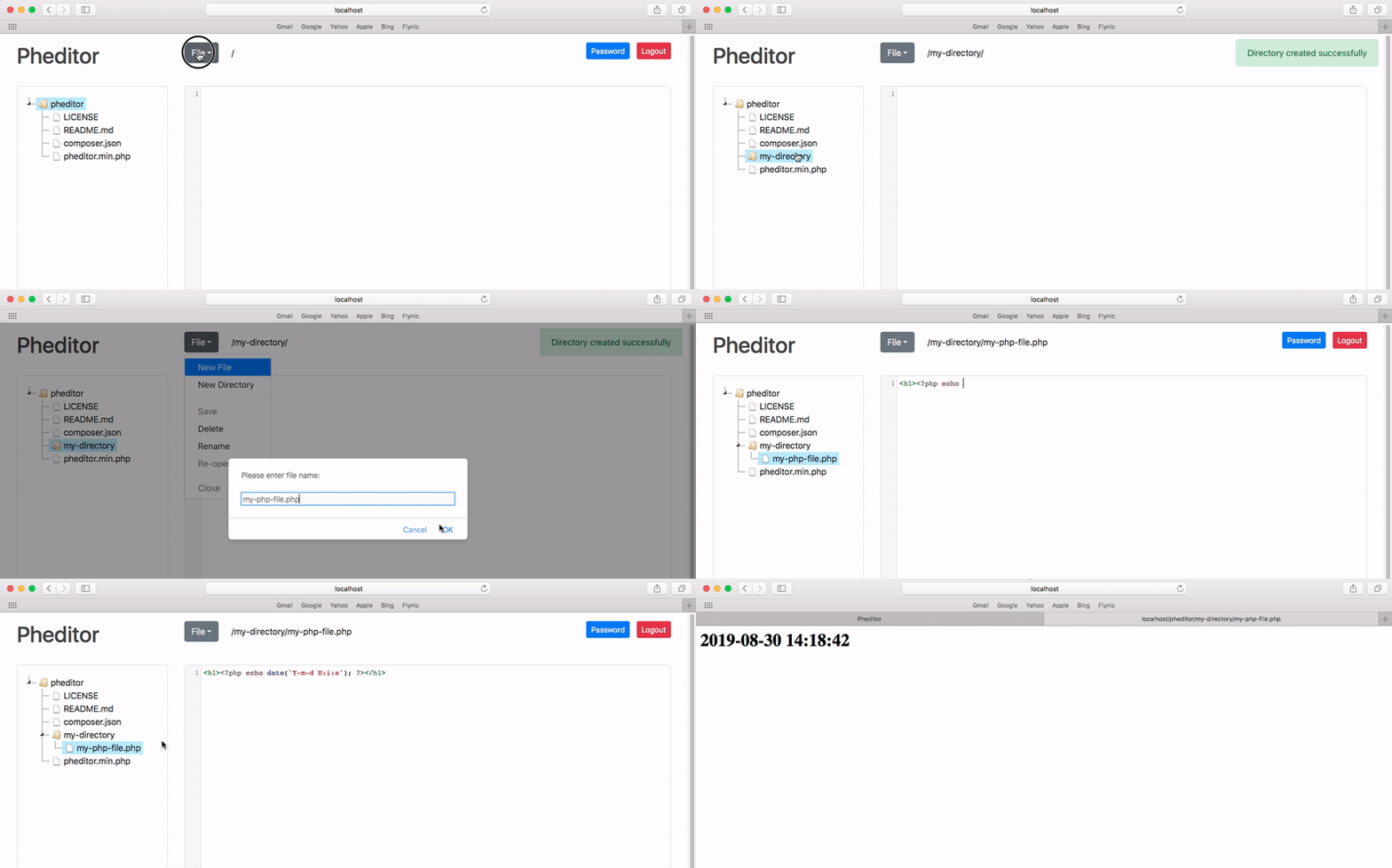
|
|
|
|
### Features
|
|
1. Editor with syntax highlighting
|
|
2. File Manager (create, rename and delete files and directories)
|
|
3. Password protected area
|
|
4. Keeping the history of edited files and changes
|
|
5. Keyboard shortcuts
|
|
6. Access levels for reading and writing and other permissions
|
|
7. Terminal
|
|
8. Dark mode
|
|
|
|
---
|
|
|
|
### Install & Usage
|
|
|
|
Install using composer:
|
|
`composer create-project pheditor/pheditor`
|
|
|
|
or just upload `pheditor.php` to your web host (and/or rename it as you wish).
|
|
|
|
---
|
|
|
|
**NOTES**:
|
|
1. The default password is `admin`. Please change the password after install or first login.
|
|
2. As the script gives permission to edit files, it is recommended to keep the address secret or protected depending on the web-server you are using.
|
|
|
|
---
|
|
|
|
**Optional settings:**
|
|
|
|
The settings would be editable in the main PHP file (pheditor.php by default).
|
|
The settings are as below:
|
|
1. Define patterns for files and directories to view/edit (empty means all files & directories)
|
|
2. Log file path
|
|
3. Show/Hide hidden files
|
|
4. Limit access to the page only for an IP address (empty means access for all)
|
|
5. Show/Hide main pheditor file (pheditor.php) in files list to edit
|
|
6. History files path
|
|
7. Word wrap
|
|
8. Changing main directory (`MAIN_DIR`)
|
|
9. Enable/Disable Terminal
|
|
10. Define allowed terminal commands
|
|
11. Change editor theme (`EDITOR_THEME`) ([theme list](https://codemirror.net/demo/theme.html))
|
|
12. New file and directory permissions (`DEFAULT_DIR_PERMISSION` and `DEFAULT_FILE_PERMISSION`)
|
|
|
|
---
|
|
|
|
**Hotkeys:**
|
|
|
|
1. New File `Ctrl (CMD) + Shift + N`
|
|
2. Save File `Ctrl (CMD) + Shift + S`
|
|
3. Switch between file manager, editor and terminal `Esc`
|
|
4. Double press `Esc` to open file menu
|
|
5. Double click on file name to view in browser window/tab.
|
|
6. Find `Ctrl (CMD) + F`
|
|
7. Find next `Ctrl (CMD) + G`
|
|
8. Find previous `Shift + Ctrl (CMD) + G`
|
|
9. Replace `Shift + Ctrl + F` or `CMD + Option + F`
|
|
10. Replace all `Shift + Ctrl + R` or `Shift + CMD + Option + F`
|
|
11. Persistent search `Alt + F`
|
|
12. Go to line `Alt (Option) + G`
|
|
13. Toggle Terminal `Ctrl (CMD) + Shift + L`
|
|
14. Terminal history (Up & Down arrow keys)
|
|
|
|
---
|
|
|
|
**Using without password:**
|
|
|
|
You can empty the `PASSWORD` constant in the source code to access the script without the password. But it is highly recommended to use it and change the default password after installation.
|
|
|
|
---
|
|
|
|
**Access Levels and Permissions:**
|
|
|
|
There are eight permissions for users that is defined in `PERMISSIONS` constant. You can remove any of them as you need.
|
|
|
|
Default value: `newfile,newdir,editfile,deletefile,deletedir,renamefile,renamedir,changepassword,uploadfile,terminal`
|
|
|
|
---
|
|
### Donation
|
|
If you found this project useful, please consider making a donation to keep this project alive.
|
|
Cryptocurrency | Address | Donate
|
|
--- | --- | ---
|
|
Bitcoin | `bc1qqjm32eupk7lw3kctlmflqh9spzalya9mqwppw9` | [TrustWallet](https://link.trustwallet.com/send?address=bc1qqjm32eupk7lw3kctlmflqh9spzalya9mqwppw9&asset=c0)
|
|
Ethereum | `0x3d7324f1718fF9f9F57b1d45c80dEdea59F0b412` | [TrustWallet](https://link.trustwallet.com/send?address=0x3d7324f1718fF9f9F57b1d45c80dEdea59F0b412&asset=c60)
|
|
|
|
---
|
|
**Thanks to:**
|
|
|
|
[Laurent](https://github.com/slolo2000), [fjavierc](https://github.com/fjavierc), [Jidbo](https://github.com/Jidbo)
|